Live / human-in-the-loop
streamlit-mcp drives apps headlessly — the agent gets the rendered element tree, and a human
watching streamlit run in a browser normally doesn't see those edits, because Streamlit
sessions are isolated (each connection has its own session_state). So "the human watches the
agent's edits appear live" isn't a connection trick — it needs shared state the app re-reads.
streamlit_mcp.live packages that in one with block. An agent edits over MCP from one process;
a browser updates live in another — no manual refresh, and no browser automation:
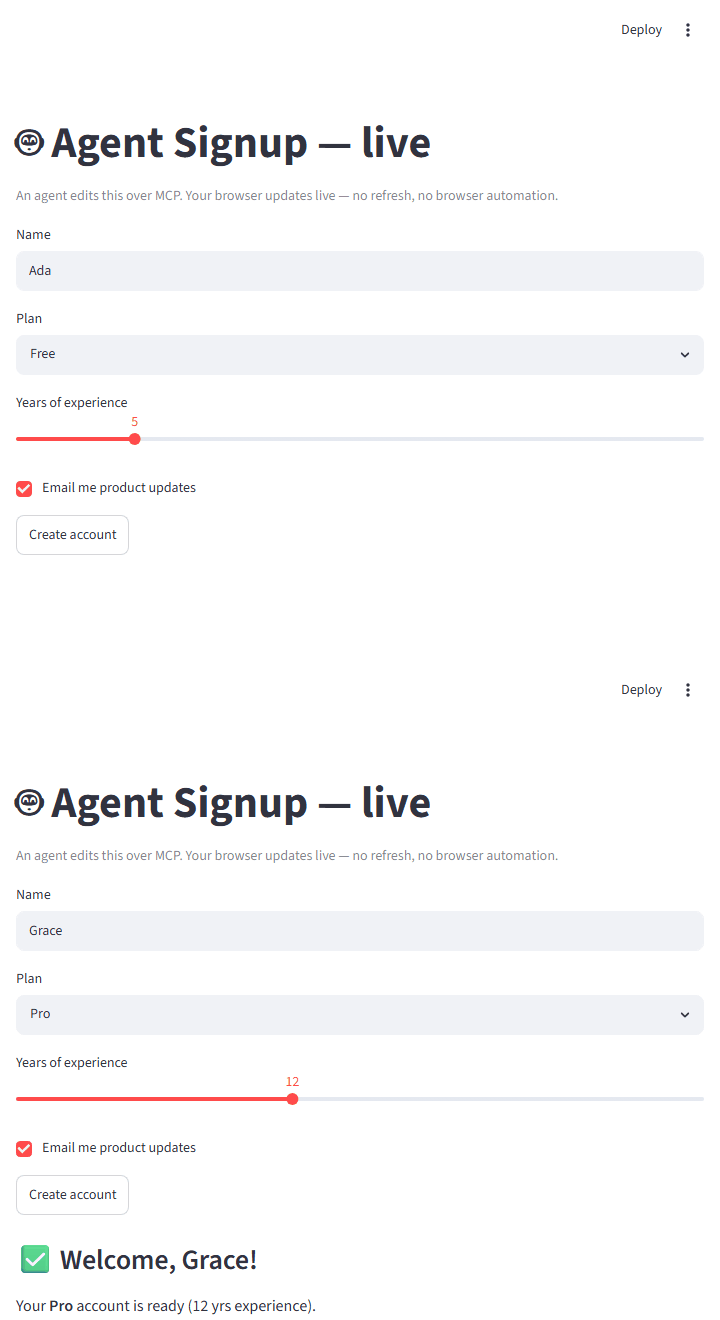
Opt in with one with block
import streamlit as st
from streamlit_mcp.live import live

with live("signup", defaults={"name": "Ada", "plan": "Free", "created": False}):
    st.text_input("Name", key="name")
    st.selectbox("Plan", ["Free", "Pro", "Team"], key="plan")
    if st.button("Create account"):
        st.session_state["created"] = True
    if st.session_state["created"]:
        st.subheader(f"Welcome, {st.session_state['name']}!")
defaultsdeclares the syncedsession_statekeys and their initial values. Synced widgets use a matchingkey=.- Action buttons aren't persistent widget state, so represent them as a
defaultsflag the app sets (e.g.created). - Pass
run_every=(default"1s") to tune how often the browser polls, orstore=to use a custom backend (see below).
Run it
Point both at the same file (the name you pass to live(...) is what links them):
streamlit run examples/live_app.py            # the human's browser
streamlit-mcp serve examples/live_app.py      # the agent, over MCP

# ...or drive it directly and watch the browser update:
streamlit-mcp call examples/live_app.py --set "Name=Grace" --set "Plan=Pro" \
    --click "Create account" --read
The browser running streamlit run updates within run_every of the agent's edit. The full
example is examples/live_app.py.
A custom store (multi-node)
The default is a local JSON file (one machine). For multiple servers, pass any object with
load() -> (version, fields) and save(fields, version):
from streamlit_mcp.live import live, Store  # Store is a typing Protocol

class RedisStore:           # sketch — wire up your own client
    def load(self): ...
    def save(self, fields, version): ...

with live("signup", defaults={...}, store=RedisStore()):
    ...
Under the hood
live(...) is a small context manager around the existing tools — no new MCP surface:
- A versioned store is the source of truth. On
__enter__, it re-seeds the syncedsession_statekeys from the store before any widget is created (the only point Streamlit lets you overwrite a widget's value), but only when the store changed externally. - Edits publish a new version. On
__exit__, if a synced widget changed (the human typed, or the agent'sset_widget/clickreran the app), it writes the new values to the store withversion + 1. The version is what prevents an echo loop. - The browser polls and adopts. In a live browser session it installs
st.fragment(run_every=...)that re-reads the version andst.rerun(scope="app")s when it changed. (Under headless AppTest — the agent, or tests — the poll is skipped; there's no browser to refresh.)
Caveats
- Synced values may be any JSON-native type plus
date/datetime/time(sodate_inputandtime_inputwork); other custom types need a customStore. - A file store is fine for one machine; use a shared
Store(Redis/DB) across servers. - It's last-writer-wins on a coarse version (atomic writes prevent torn reads, not lost concurrent updates) — fine for human-in-the-loop, not a CRDT.
- Polling reruns the script every
run_every— tune it for your app. - The store persists across restarts — it's the source of truth, so
defaultsonly seed an empty store. A fresh browser shows the last values written, notdefaults; to reset, delete the store file (FileStorelives at<tempdir>/streamlit_mcp_live_<name>.json) or change thelive()name.