Dynamic / agent-driven layout
The agent never edits your script and there's no DOM to manipulate — it drives Streamlit's
semantic tree with the same set_widget/click it always uses. But because Streamlit reruns
the whole script on every interaction, the rendered layout is a function of state. So when
the agent changes state the app branches on, the rerun produces a different structure — more or
fewer components, a different layout, reordered items. With live, a human watches it
happen in their browser.
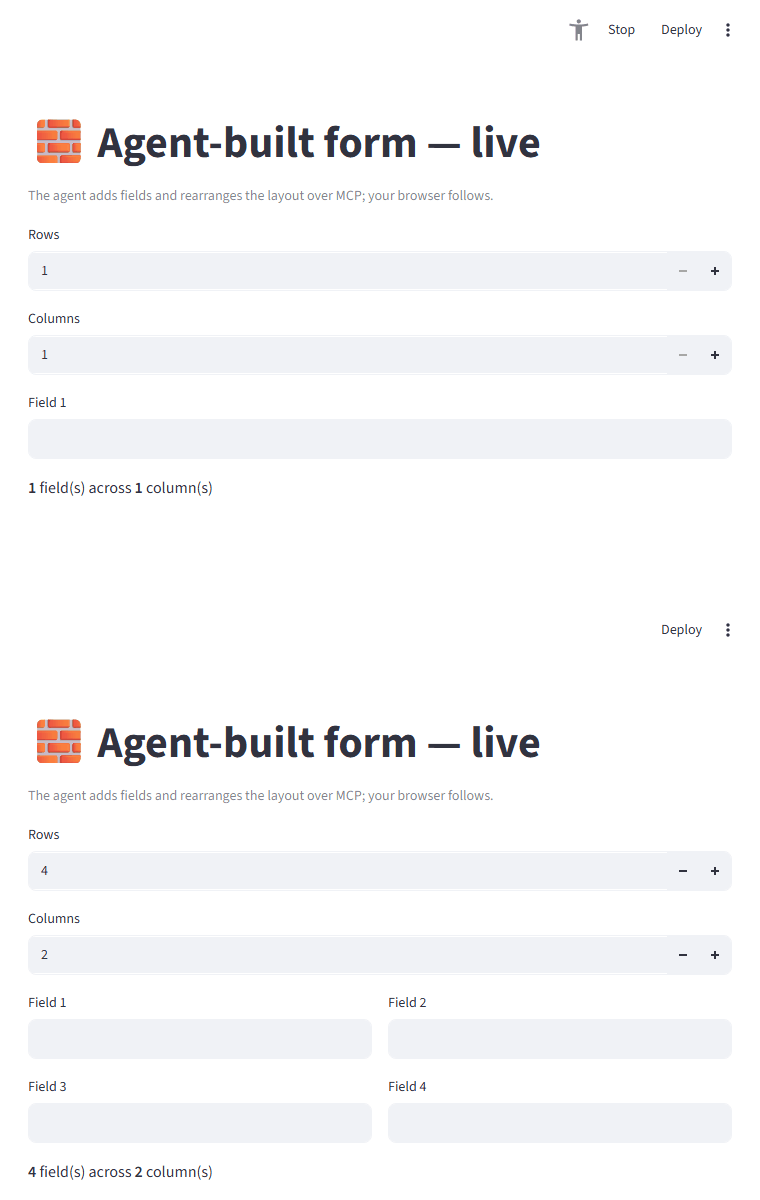
The agent set Rows=4 and Columns=2 over MCP; the form grew from one field to four, re-flowed
into two columns — no manual refresh, no browser automation.
How: make structure a function of state
Render your components from state, and let the agent drive that state through widgets:
import streamlit as st
from streamlit_mcp.live import live

# Sync only the *controlling* state (the structure), not each generated field.
with live("dynamic", defaults={"rows": 1, "cols": 1}):
    rows = int(st.number_input("Rows", min_value=1, max_value=6, key="rows"))
    cols = int(st.number_input("Columns", min_value=1, max_value=3, key="cols"))

    columns = st.columns(cols)
    for i in range(rows):
        with columns[i % cols]:
            st.text_input(f"Field {i + 1}", key=f"field_{i}")
streamlit-mcp call examples/dynamic_app.py --set "Rows=4" --set "Columns=2" --read makes the app
render four fields across two columns. The full example is
examples/dynamic_app.py.
What the agent can and can't do
| Want | Possible? | How |
|---|---|---|
| Add components | ✅ if the app supports it | Drive a "count" input or click an "add" button; the script renders the new widgets on rerun |
| Show / hide sections | ✅ | Toggle a checkbox/selectbox the app gates st.expander/st.tabs/if on |
| Change layout | ✅ | A control the app uses to choose st.columns vs stacked, column count, etc. |
| Reorder components | ✅ only if the app renders from an ordered state list (e.g. a "move up" button reordering a session_state list) |
|
| Inject a component the script never defines | ❌ | The agent can't author new st.* calls or edit code |
| DOM / pixel rearrangement | ❌ | There's no browser/DOM — it's the AppTest semantic tree |
The agent rearranges the app's declared possibilities, not arbitrary UI. This is the project's agent-native principle: the author decides what's mutable by exposing it as widgets/actions.
Structural changes must go through widgets
Drive structure with set_widget/click (which run inside the rerun, where session_state
is real). @mcp_tool semantic tools are invoked outside a script run, so they can't mutate
the live widget tree — use them for app-independent actions, not layout changes.
Syncing to the browser
For the human's browser to follow, sync the controlling state (a count, a layout choice, a
list) via live(...)'s defaults and render the components from it — don't try to sync an
unbounded set of dynamically-keyed widgets. The dynamically generated fields above are local;
only rows/cols (the structure) are synced, which is what makes the layout re-flow live.